Projoint
Start free
Early access Free for up to 10 members

Your team’s tasks, chat and docs. In one place.

Projoint is a project workspace for small teams, freelancers and agencies. Plan tasks with deadlines, talk right next to the work, and keep docs, files and time together — on your laptop and your phone.

No card required · Unlimited projects and tasks · Works on iPhone and Android

Wide hero crop of My Work: tasks across projects grouped by deadline.
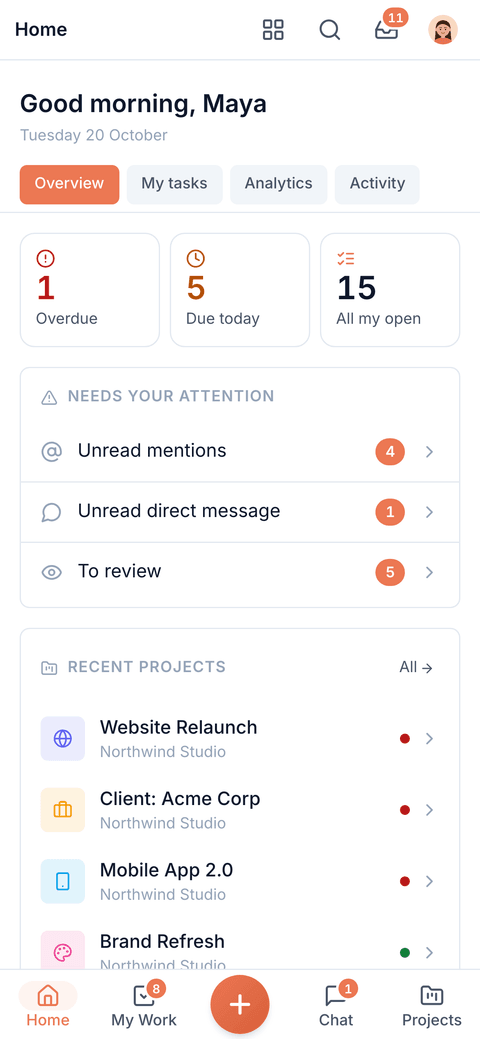
Phone home: greeting, overdue / due-today / open tiles, what needs attention and recent projects.
What’s inside

Everything a small team needs. Nothing it has to glue together.

Plan it, talk about it and keep the files in the same place — instead of a task tracker, a chat app and a shared drive that never quite line up.

My Work

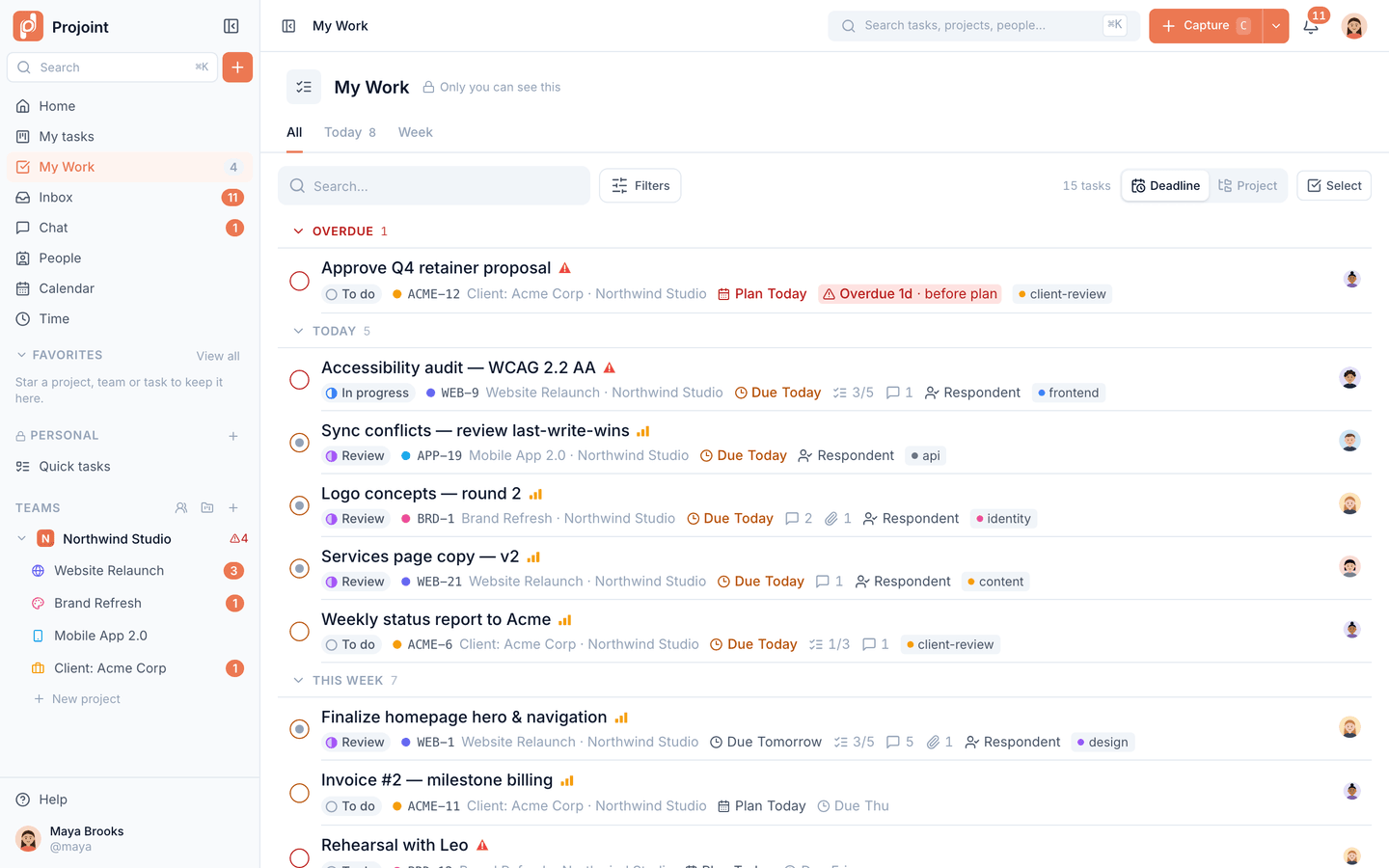
Your day in one list — Today, Week and All views across every project, so you always know what’s next.
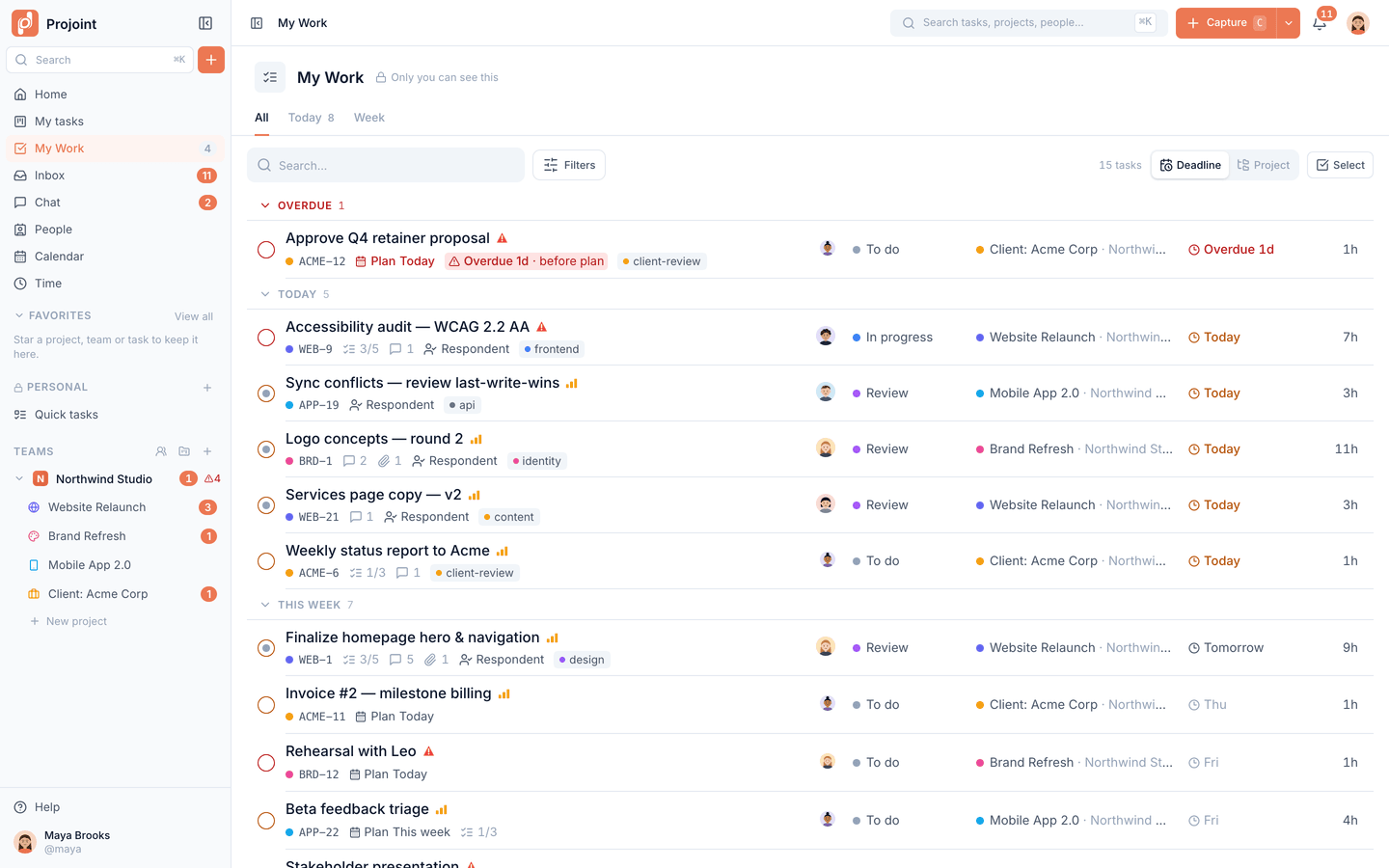
My Work: every task assigned to me across projects, grouped by deadline with status, project and progress.

On your phone

Add it to your Home Screen on iPhone or Android, with push notifications.
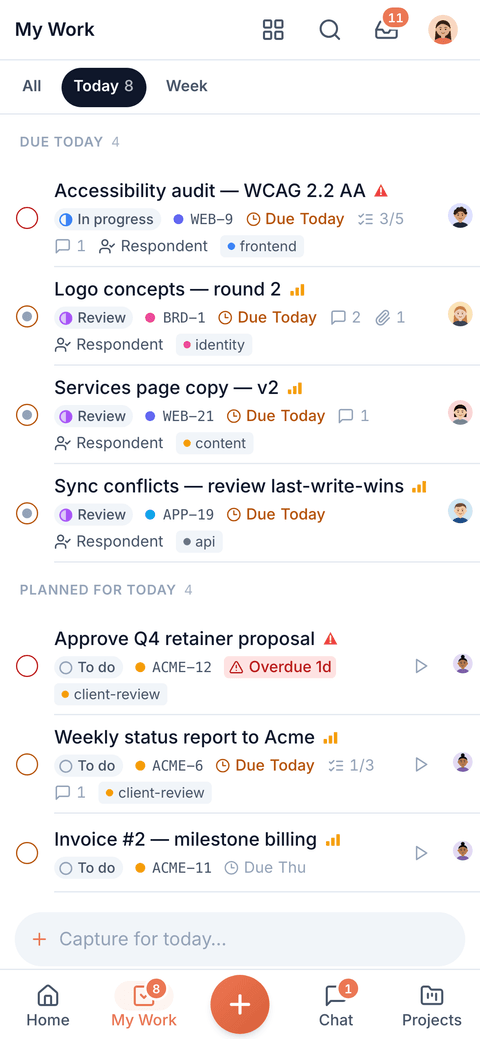
Phone My Work, Today view: overdue and due-today tasks with status, project and progress.

Board, list, calendar

See any project as a board, a list or a calendar — whatever fits the work.
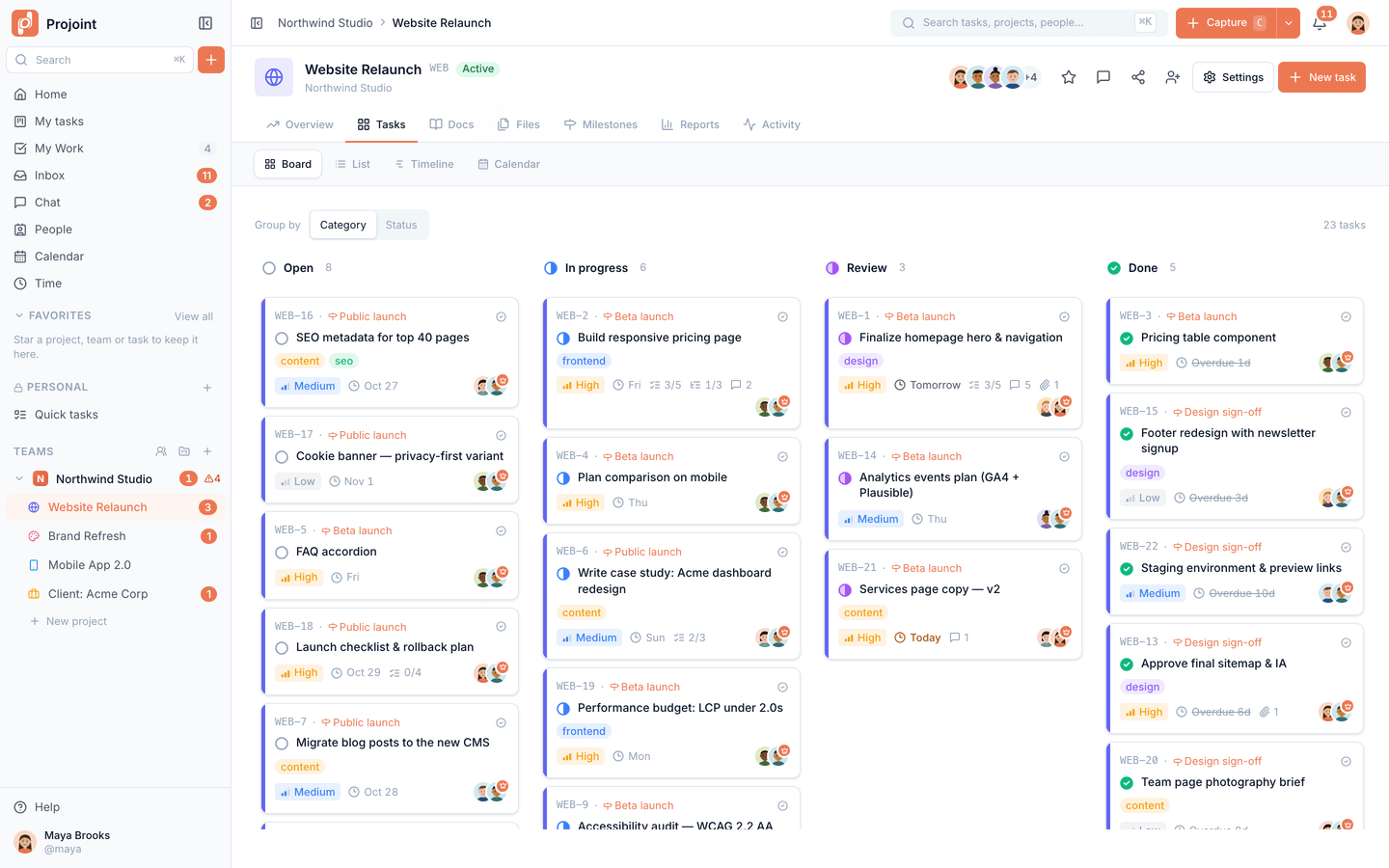
Kanban board for the Website Relaunch project with tags, priorities, deadlines, checklists and assignees.

Chat next to the work

Topics per team and project, DMs, threads, reactions, mentions and voice notes.
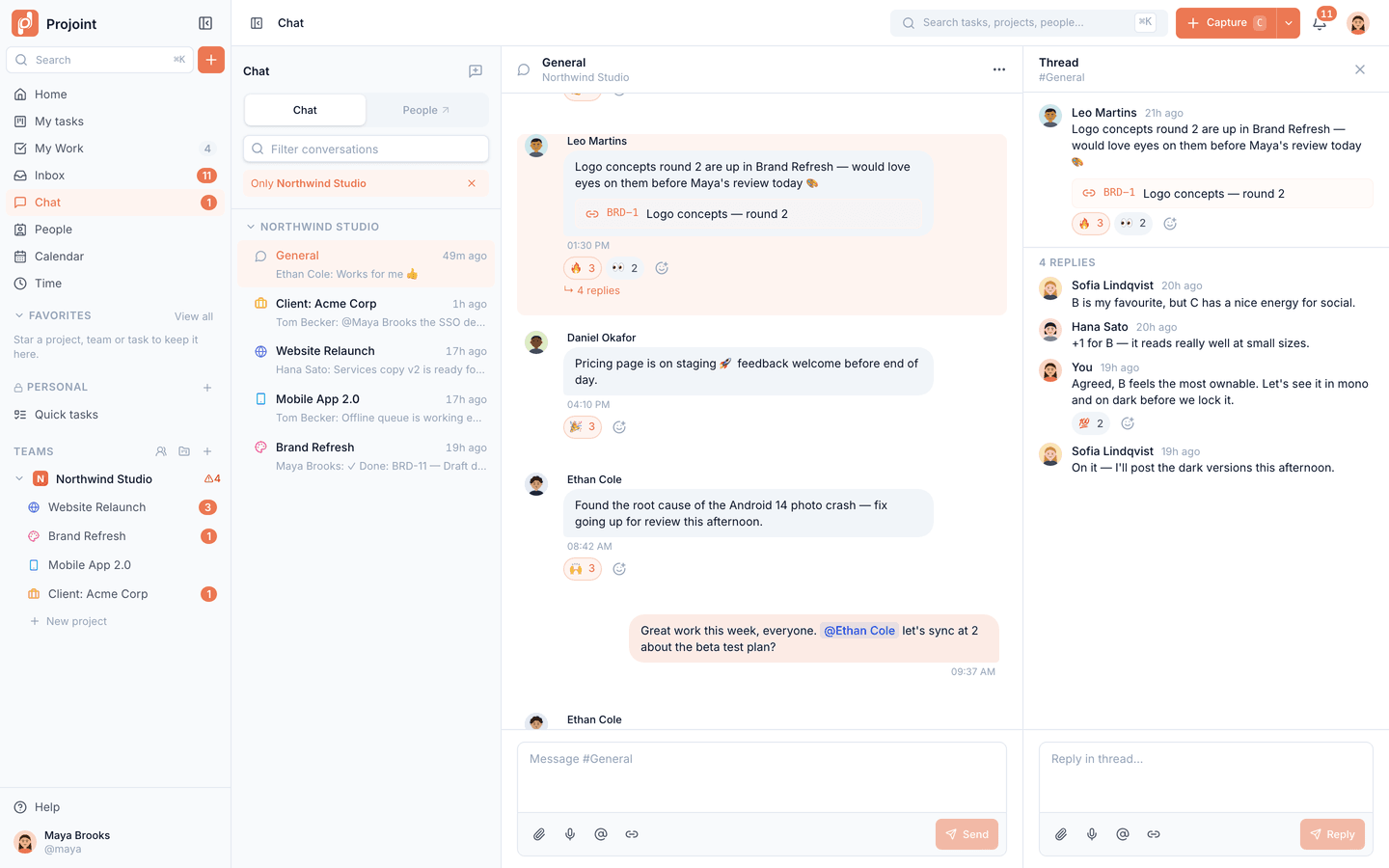
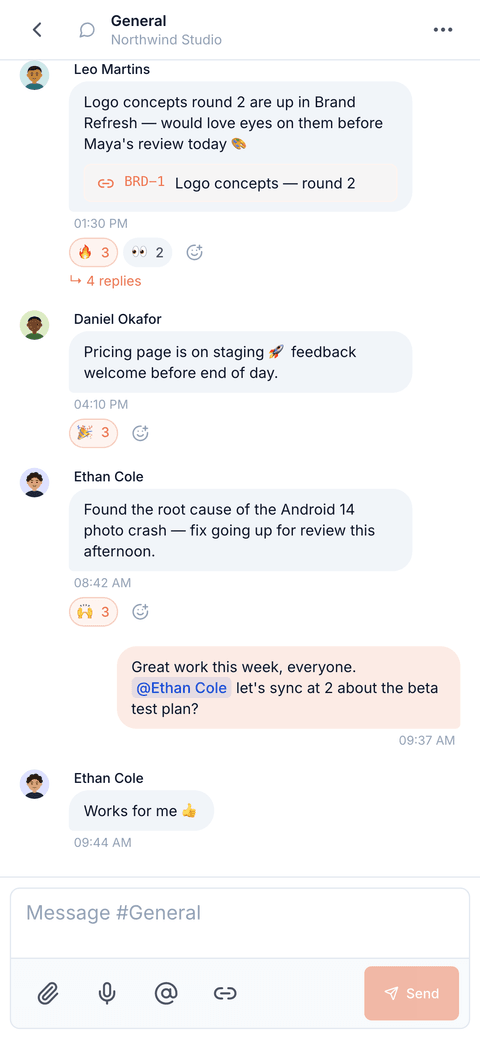
Team chat: #General with a linked task card, emoji reactions and an open thread.

One inbox

Mentions, assignments and replies land in one place, so nothing gets lost.
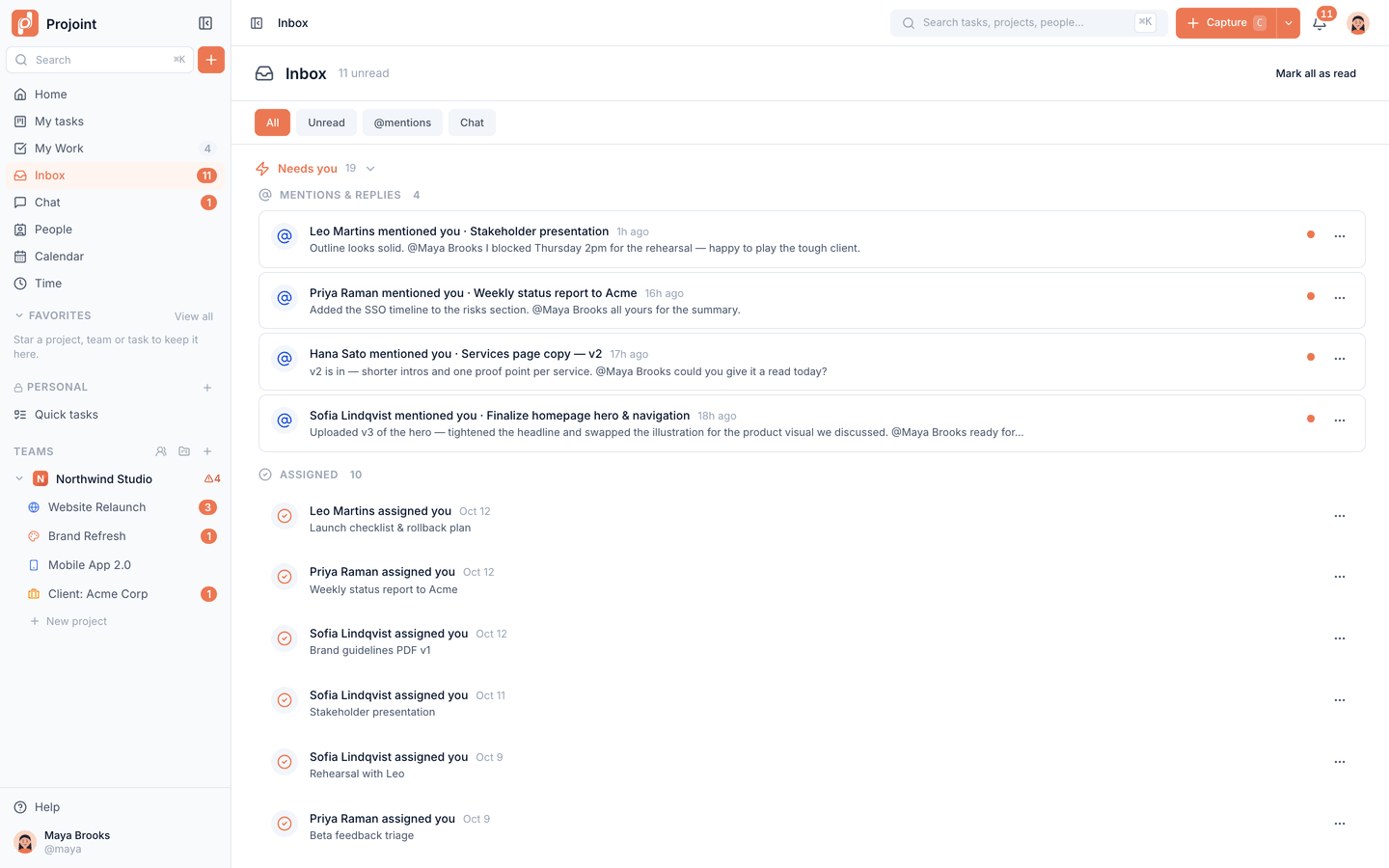
Inbox: mentions, replies and assignments that need you, in one prioritised feed.

Timeline

Lay the plan out on a timeline with milestones, and see what’s running late.
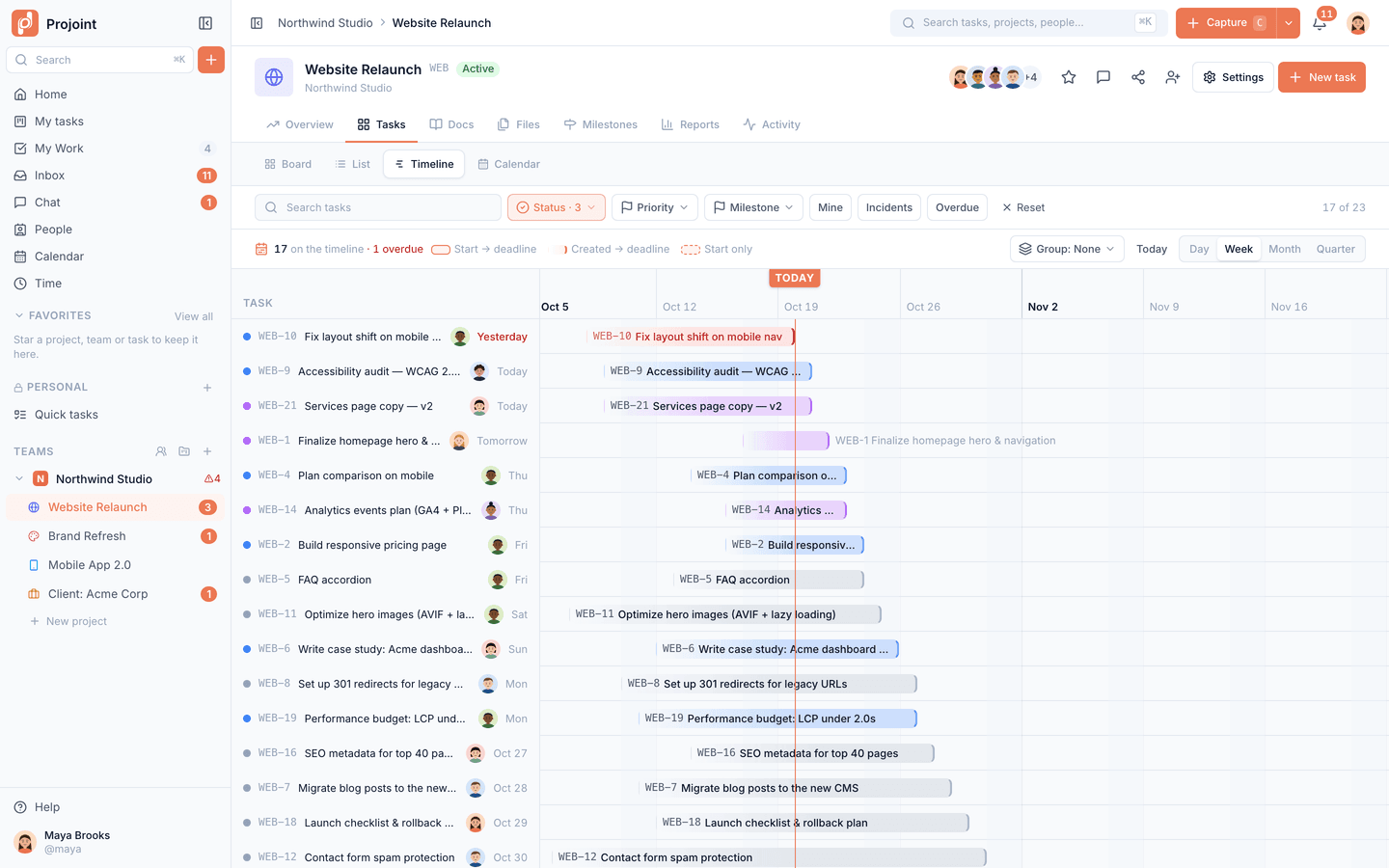
Project timeline (Gantt) with today line, task bars from start to deadline and overdue highlights.

Project money

Rolling out

Rates, budgets, earned and forecast for owners and managers — hidden from everyone else.
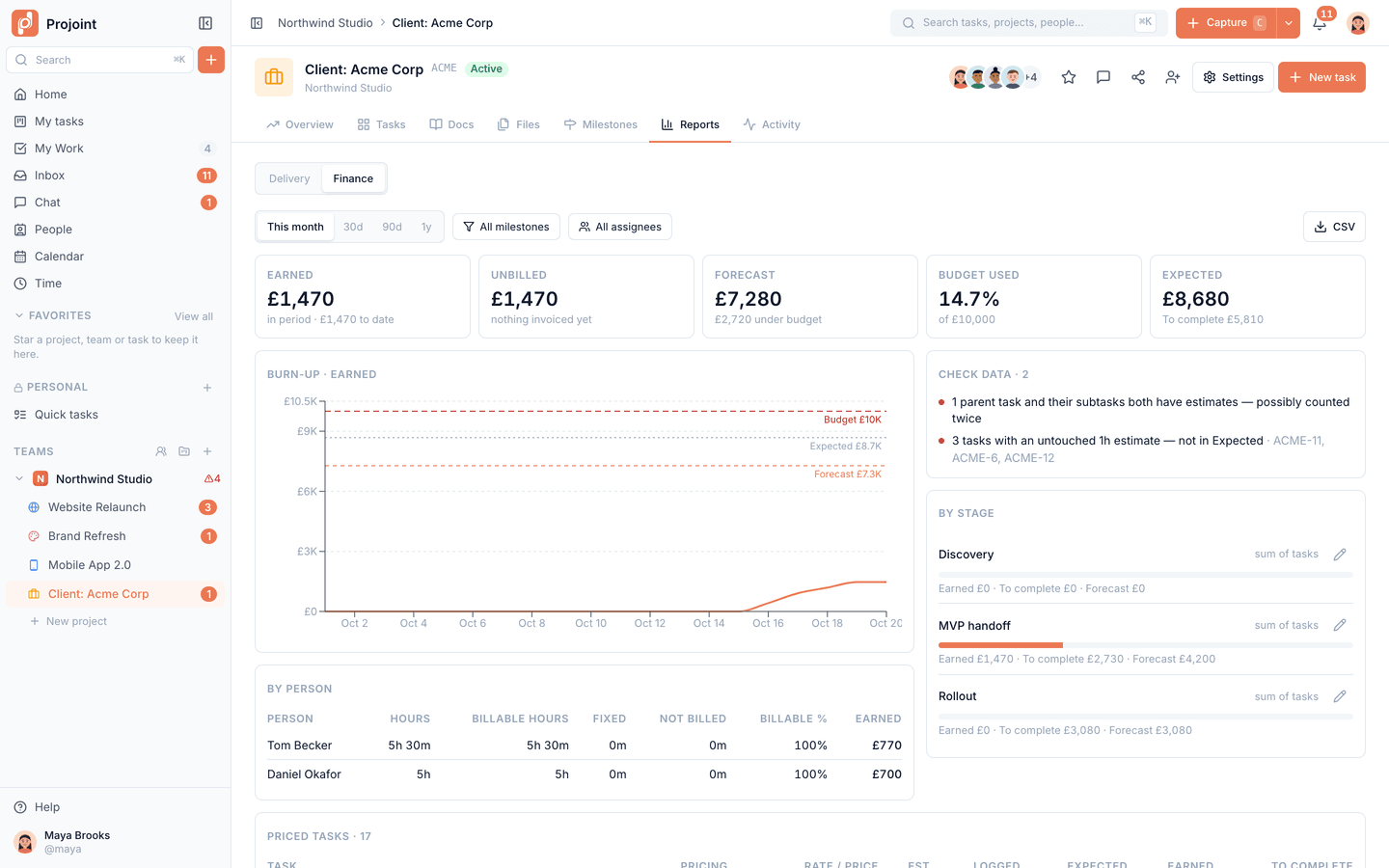
Project finance for the Acme Corp engagement: earned vs budget, unbilled time and cost by task.
Product tour

A closer look at the work, day to day.

See what needs you, the moment you sign in

Home sums up your day: what needs attention, your stats and workload by project.
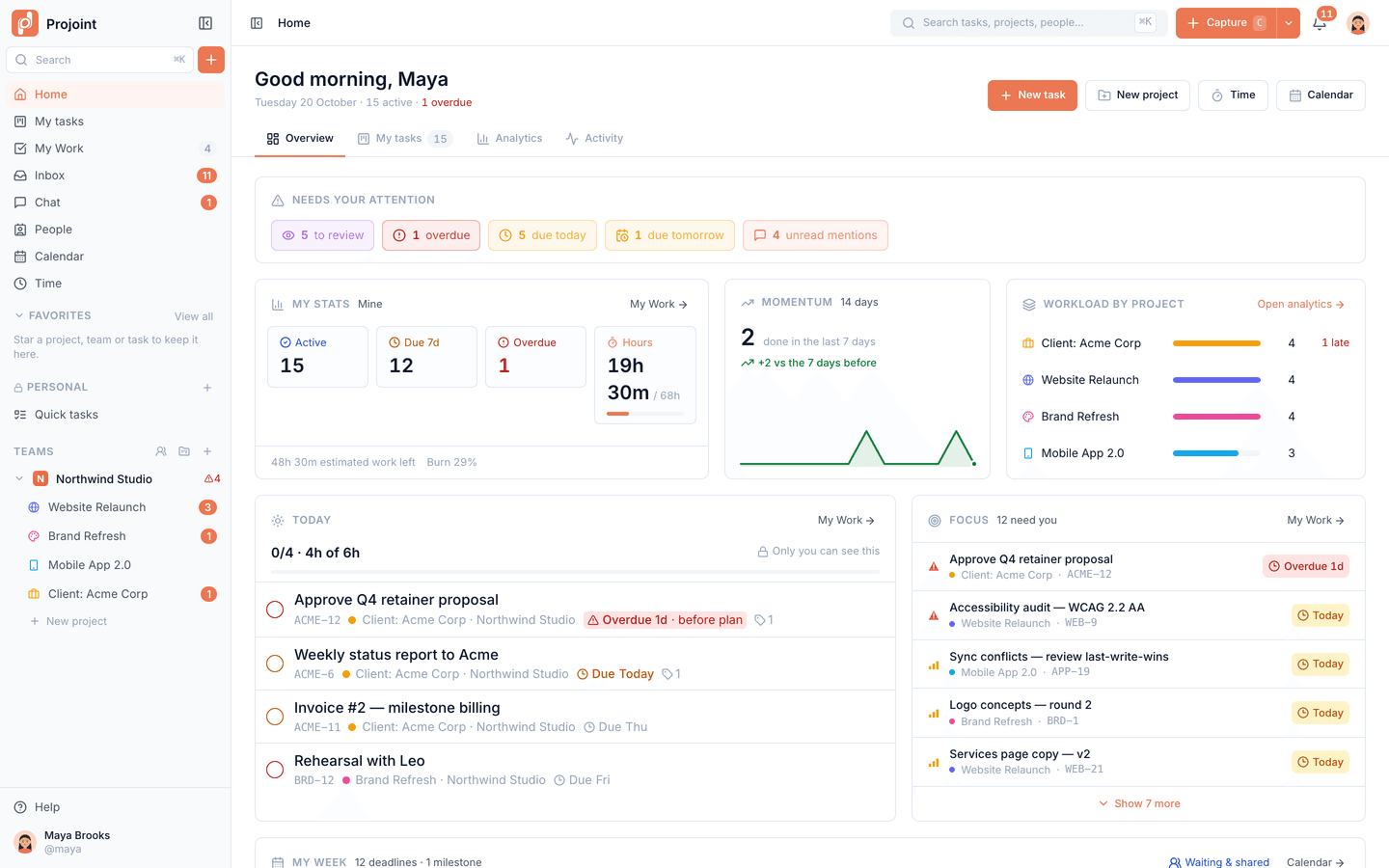
  • Overdue, due-today and review chips
  • Today’s plan from My Work
  • Workload by project
Home overview: what needs attention, personal stats, momentum, workload by project and focus list.

Start every day knowing what’s next

My Work pulls your tasks from every project into one list.

  • Today, Week and All views
  • Overdue work called out
  • Plan time per task
My Work: every task assigned to me across projects, grouped by deadline with status, project and progress.

Every project, the way you think about it

Switch a project between board, list, calendar and timeline.

  • Statuses you can drag between
  • Assignees, priorities and due dates
  • Filters for what matters now
Kanban board for the Website Relaunch project with tags, priorities, deadlines, checklists and assignees.

Tasks that hold the whole story

Details, discussion and files stay on the task they belong to.
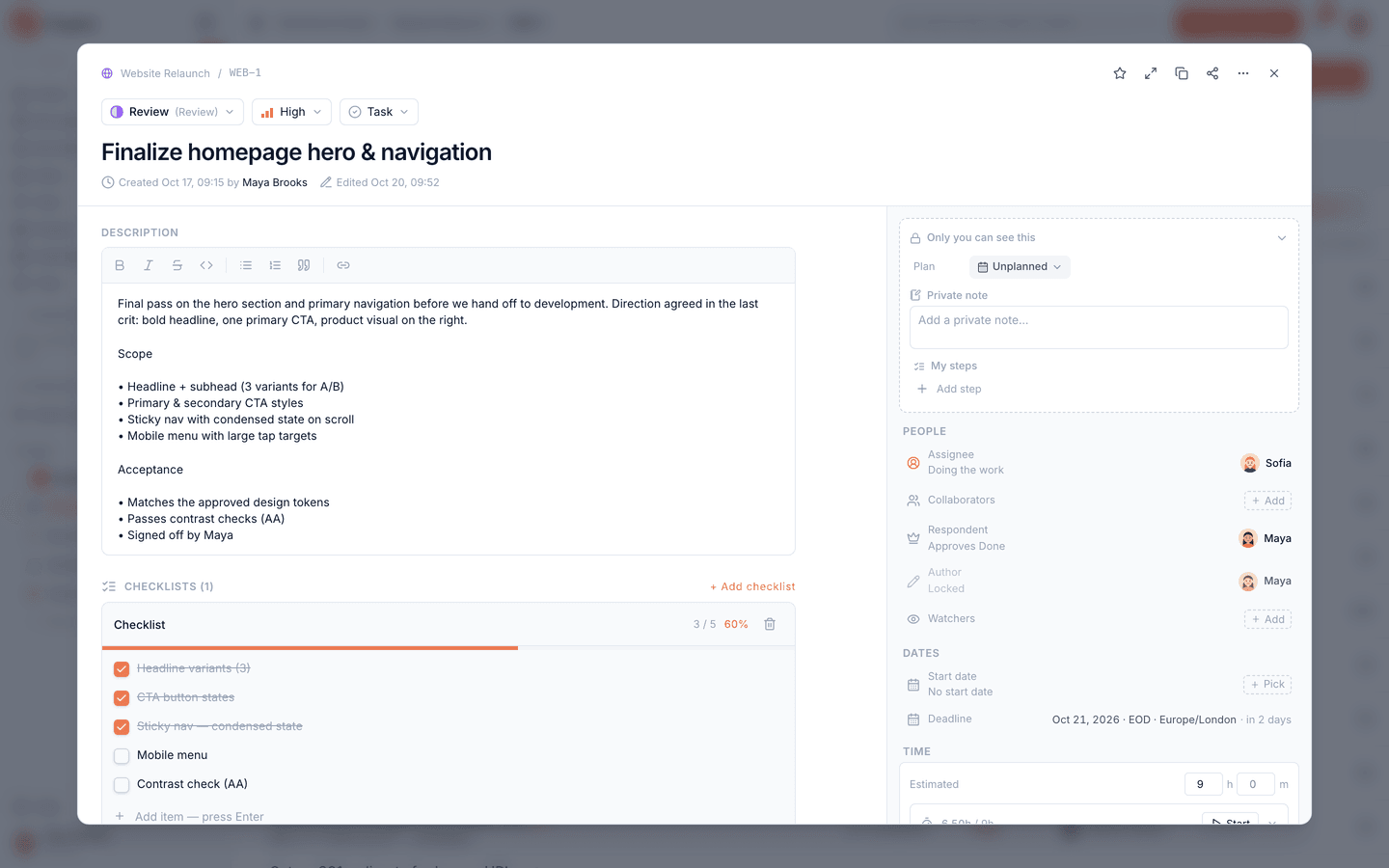
  • Subtasks, checklists and dependencies
  • Recurring tasks
  • Comments, attachments and time logged
Task detail: description, checklist progress, people, dates and time tracking.

Talk where the work happens

Team chat with topics per team and project — no separate chat app.

  • Direct messages and threads
  • Reactions and @mentions
  • Voice notes
Team chat: #General with a linked task card, emoji reactions and an open thread.

One inbox for everything that needs you

Mentions, assignments and replies collect in one place.

  • In-app and push notifications
  • Mark as read, snooze or archive
  • Jump straight to the task or message
Inbox: mentions, replies and assignments that need you, in one prioritised feed.

See the plan, then move it

Milestones on a timeline you can drag to reschedule.

  • Milestones with dates
  • Drag to reschedule
  • Today line for where you are
Project timeline (Gantt) with today line, task bars from start to deadline and overdue highlights.

The whole team’s health on one page

Team overview brings open and overdue work, milestones and workload together.
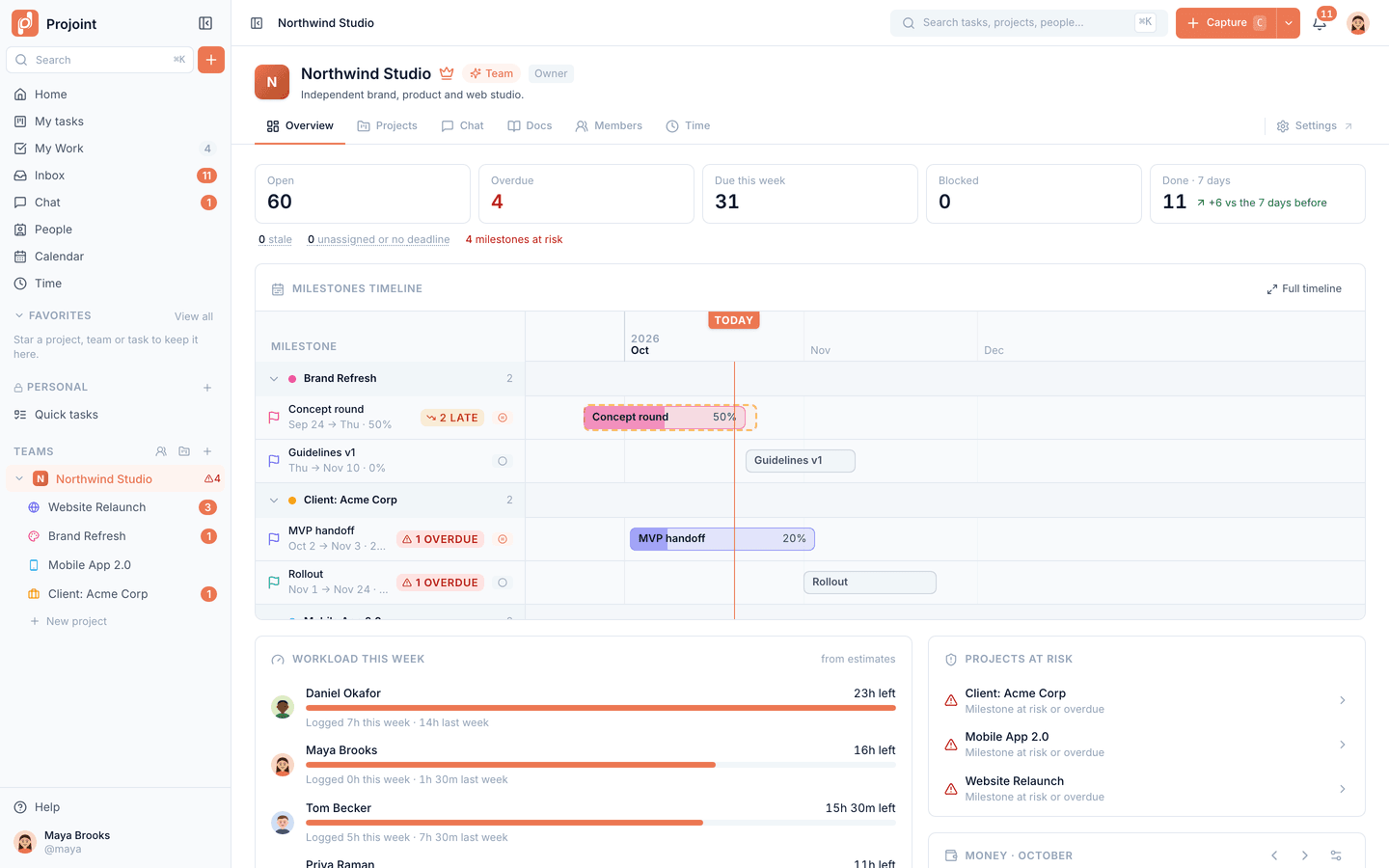
  • Health tiles for the team
  • Milestones across projects
  • Workload and projects at risk
Team overview: health tiles, milestones timeline, workload and projects at risk.
Mobile

The whole workspace, in your pocket.

Your tasks, chat and inbox work just as well on the phone — for the moments you’re away from your desk.

  • Installs like an app

    Add Projoint to your Home Screen on iPhone or Android — it opens full-screen, no app store needed.

  • Push notifications

    Mentions, assignments and replies reach you on your phone.

  • Built for thumbs

    Create tasks, update them and reply in chat with a layout designed for the small screen.

Native App Store and Google Play apps are not available yet.
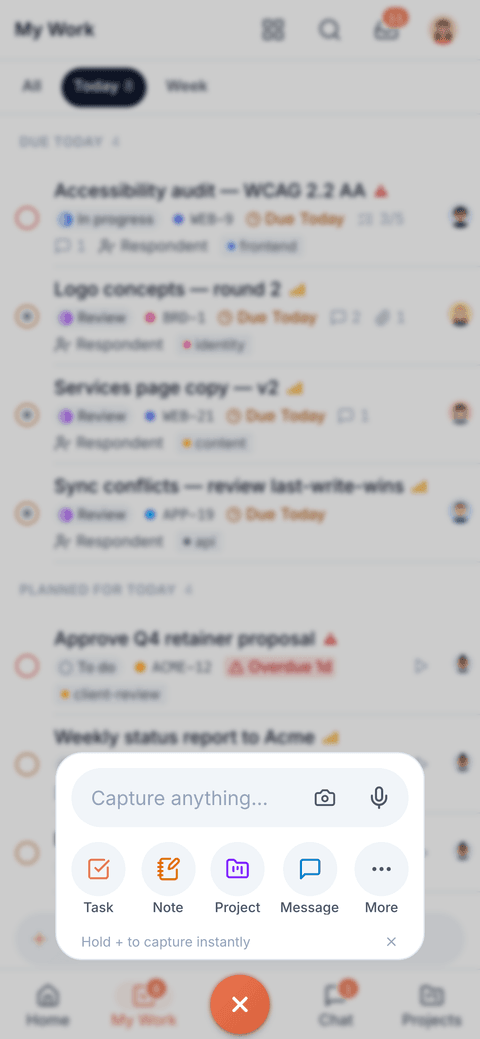
The Create popover opened from the centre tab-bar button.
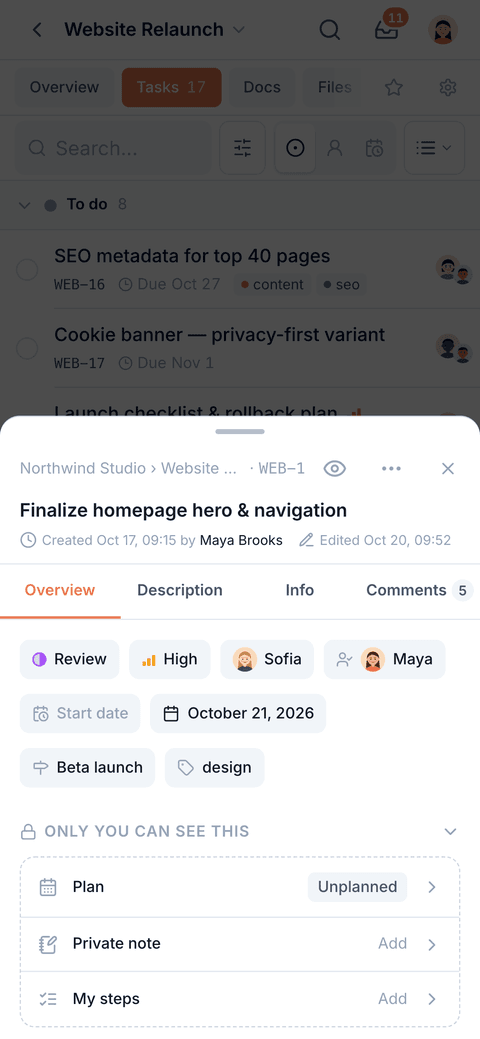
Phone task sheet: status, priority, people, deadline, milestone and tags for a task.
Phone chat: the #General conversation with a linked task card, reactions and a thread.
And everything around it

The rest of the toolkit, built in.

  • Docs

    Nested docs for specs, notes and how-tos, next to the project they describe.

  • Files

    Project files in folders, attached where the work happens and served through short-lived links.

  • Time tracking

    Start a timer or log time by hand, review it per person and project, export a timesheet.

  • Subtasks and repeats

    Checklists, subtasks, task dependencies and recurring tasks for work that comes back.

  • Roles and client access

    Preset roles for your team. Invite clients to just the projects they need to see.

  • Private Personal space

    A workspace that is only yours, for tasks and notes that never show up in a team.

AI · bring your own key

AI that works on your tasks — with your key, under your rules.

AI is optional. On a paid plan, add your Anthropic, OpenAI or OpenRouter key and the assistant switches on. We don’t train models on your content.

  • Assistant on your own key

    Ask about your work, create tasks from plain text, get a daily summary on Home. Your provider bills you directly — we add no markup.

  • Agents you stay in charge of

    Set an agent’s monthly budget and how much it may do on its own. Pause it any time.

  • Claude, ChatGPT, Cursor — any MCP client

    Connect in one click or with a personal access token — on every plan, including Free. Your client reads and updates tasks with your permissions.

Claude Code · terminal
$ claude mcp add --transport http projoint \
  https://api.projoint.tech/api/mcp/user \
  --header "Authorization: Bearer <your token>"
The app generates this command with your token filled in.
Available now
Assistant and agents on your own key, on Personal and Team.
Free on every plan
MCP and one-click Claude & ChatGPT connection.
Coming soon
Managed AI — we provide the key, about +$8/mo.
Security & privacy

Built so your data stays yours.

How we protect it

Isolated in the database

Postgres row-level security checks every read, so one team never sees another’s data.

No training on your content

We don’t train AI models on what you put in Projoint.

Two-factor sign-in

Authenticator-app 2FA for your account — and you can require it for your team.

Access you can see

A team activity timeline, plus a log of any staff access to your account for support.

Pricing

Free to start. Simple when you grow.

Unlimited projects and tasks on every plan. AI runs on your own key, so there is no per-token markup.

Free

Small teams and trying things out

$0 forever
  • Up to 10 members per team
  • Unlimited projects and tasks
  • Preset roles · client access scoped to projects
  • Tasks, boards, timeline, My Work, chat, docs, time tracking
Start free

Personal

For one person and their own work

$5 /mo
  • Everything in Free, for your Personal space
  • 5 GB storage · 100 MB per file
  • AI assistant with your own key (BYOK)
  • REST API and tokens for scripts
Start free

Team

For teams

Teams that run their work in Projoint

$10 /member/mo
  • Everything in Free, unlimited members
  • 10 GB storage per member · 500 MB per file
  • AI assistant and agents with your own key (BYOK)
  • REST API and tokens for scripts · webhooks
Start free

Start free, then request the upgrade in Billing. We switch it on by hand during early access — online checkout is not live yet. Compare plans →

FAQ

Questions, answered plainly.

What is Projoint, and who is it for?
A project workspace for small teams, freelancers and agencies: tasks, boards and timelines, team chat, docs, files and time tracking in one place. You can also invite clients to just the projects they need.
Is it free?
Yes. Free covers up to 10 members per team, unlimited projects and tasks, 500 MB of storage and 25 MB per file — no card required — and you can connect Claude, ChatGPT or Cursor over MCP. Personal is $5/month and Team is $10 per member per month; they add storage, the REST API, webhooks and the built-in AI features.
How do I pay for a paid plan?
Online checkout is not live yet. Start free, then press “Request upgrade” in Billing and we switch the plan on for you. We’ll confirm the price with you before anything is charged.
How does AI work — do I need my own key?
For the built-in assistant and agents, yes: today they run on your own key (Anthropic, OpenAI or OpenRouter) on a paid plan. Your provider bills you directly and we add no markup. Managed AI, where we provide the key for about +$8/month, is coming soon. Connecting Claude or ChatGPT over MCP needs no key and works on every plan. AI is optional — everything else works without it.
Do you train AI on my data? How is it protected?
No, we don’t train models on your content. Team data is isolated with Postgres row-level security, and files are served through short-lived signed links. You can turn on two-factor sign-in.
Is there a mobile app?
Projoint works in the mobile browser and installs to the Home Screen on iPhone and Android, with push notifications. There are no App Store or Google Play apps yet.
Will I get email notifications?
Notifications arrive in the in-app inbox and as push notifications. By email we only send account messages (sign-up, password reset) and invitations today. Email notifications are planned for paid plans.
Can I use it with Claude Code or Cursor?
Yes, on every plan, including Free. In the app, open your avatar → Connect Claude & AI apps: add Projoint to claude.ai or ChatGPT with one click, or copy the ready-made setup for Claude Code, Cursor or any MCP client.
What languages does it support?
The app is available in English, Russian, Ukrainian, Spanish, German, French and Brazilian Portuguese. It starts in your browser’s language, and you can switch at any time.

Bring your team’s work into one place.

Free for up to 10 members. No card required. Add AI with your own key when you’re ready.